












X gives users control over what they see. By default, the platform hides media marked as sensitive. This guide shows you how to change that setting across every device.
Understanding X's Sensitive Content Policy
X classifies certain media as "sensitive content." This includes graphic imagery, violence, and sexually suggestive material. The platform requires creators to mark such content appropriately, and viewers see a warning screen by default.
There are clear boundaries to what X permits. Illegal content, extreme violence, and material promoting harm remain prohibited regardless of your settings. The sensitive content toggle only affects media that falls within X's acceptable use policy.
Enabling NSFW Content on Desktop
The web browser offers the most direct path to changing your settings.
Follow these steps:
- Navigate to x.com and log into your account
- Click "More" in the left sidebar (the three-dot icon)
- Select "Settings & Privacy"
- Click "Privacy and safety"
- Select "Content you see"
- Check the box for "Display media that may contain sensitive content"
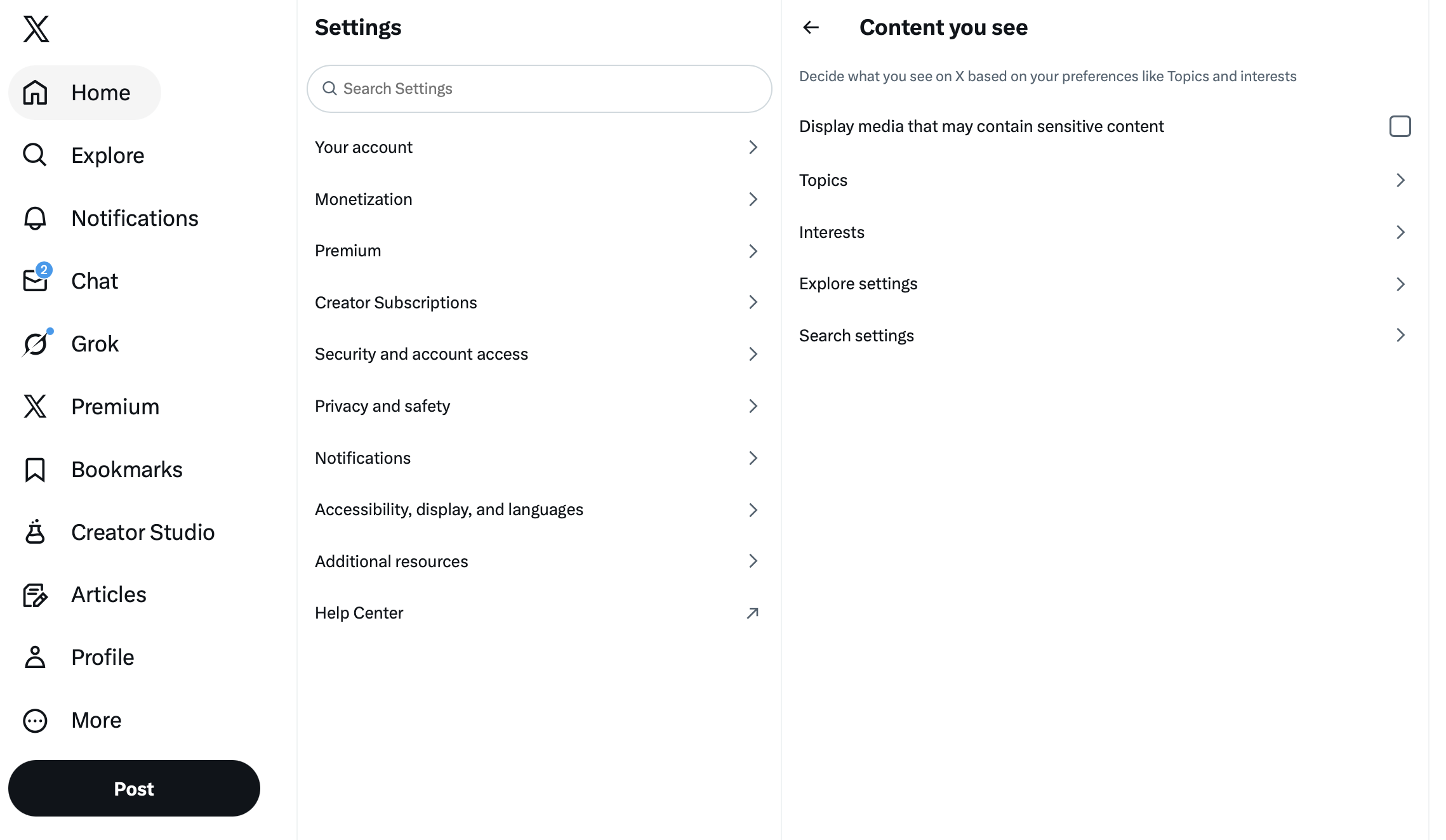
The change takes effect immediately. Your timeline will now show media that was previously hidden behind warning screens.
Enabling NSFW Content on Android
Android users can adjust this setting directly within the app.
Here's the process:
- Open the X app on your Android device
- Tap your profile icon in the top-left corner
- Tap "Settings & Support" to expand the menu
- Select "Settings and Privacy"
- Tap "Privacy and safety"
- Tap "Content you see"
- Toggle on "Display media that may contain sensitive content"
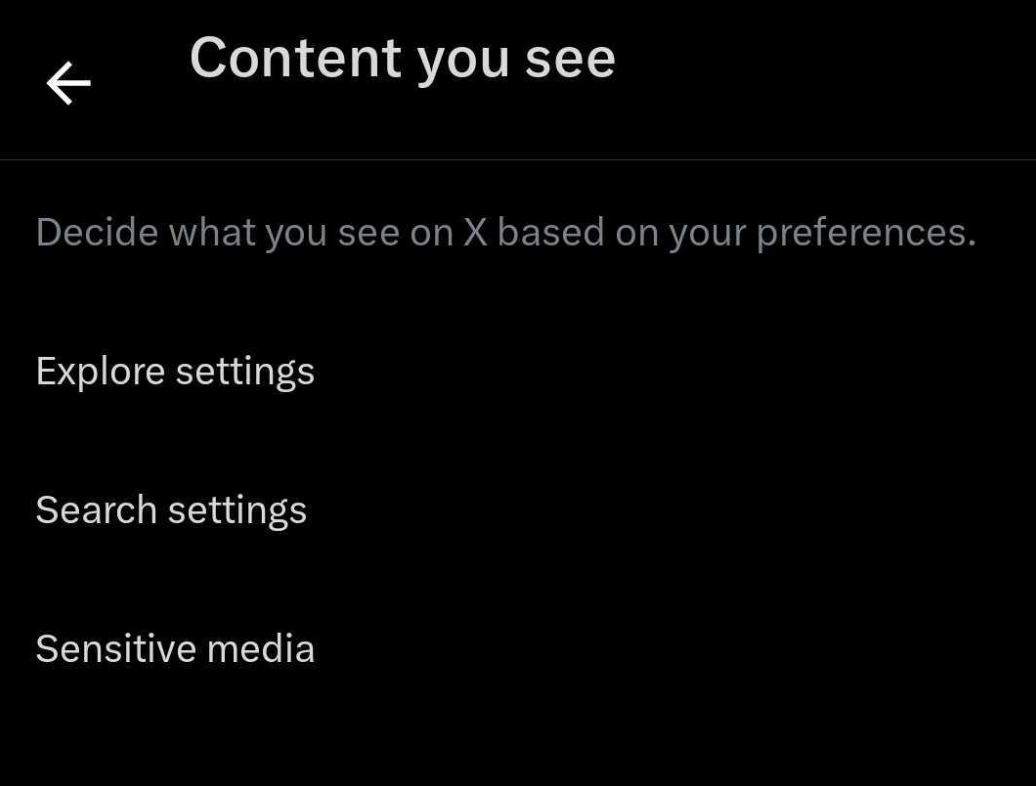
Your settings sync across the platform. Any change made on Android applies to your account everywhere.
Enabling NSFW Content on iOS
Apple's App Store policies create a limitation here. The sensitive content toggle does not appear in the iOS app.
The workaround is straightforward: use a web browser on your iPhone or iPad. Open Safari or Chrome, navigate to x.com, and follow the desktop instructions above. Once you enable the setting through the browser, it applies to your entire account. The iOS app will then display sensitive content normally.
This is the only method for iOS users. There is no in-app alternative.
Bypassing Individual Content Warnings
Even with sensitive content enabled, X sometimes adds warnings to specific posts. You will see messages like "This media may contain sensitive material" on particularly graphic content.
To view these posts, tap directly on the warning message. The content reveals itself. This is per-post behavior and functions as intended. The main setting controls your default experience, while individual warnings provide an extra layer of choice for specific media.
Turning Off Safe Search
X applies a separate filter to search results. Even with sensitive content enabled in your timeline, search may still hide certain results.
To disable Safe Search on desktop:
- Go to x.com and log in
- Click "More" then "Settings & Privacy"
- Navigate to "Privacy and safety"
- Click "Content you see"
- Uncheck "Hide sensitive content"
To disable Safe Search on mobile:
- Open the X app
- Tap your profile icon
- Go to "Settings & Support" then "Settings and Privacy"
- Tap "Privacy and safety"
- Tap "Content you see"
- Toggle off "Hide sensitive content"
With both settings adjusted, your search results will include all relevant content without filtering.
Curating Your Content Experience
Enabling sensitive content is a broad toggle. It opens the floodgates. For finer control over what appears in your feed, consider how you manage your following list.
Three strategies that help:
- Audit your follows regularly. Accounts you followed years ago may no longer align with your interests. Removing them cleans up your timeline.
- Identify spam and bot accounts. These often post untagged sensitive content. Removing them improves feed quality.
- Use mute and block strategically. If specific accounts post content you prefer not to see, these native tools provide precise control.
The goal is balance. You want access to the content you choose to see, not an overwhelming stream of everything the platform permits.
Troubleshooting Common Issues
The setting reverts on iOS: You must change it through a web browser, not the app. The browser change persists across all devices.
Warnings still appear on individual posts: This is normal. The main setting controls your default view, but X adds extra warnings to particularly sensitive media. Tap to reveal.
Content remains hidden after enabling the setting: Some content violates X's policies entirely and gets removed. No setting can surface content that X has taken down.
Age restrictions apply: Users under 18 cannot access certain sensitive content regardless of settings. Ensure your birthdate on X is accurate.
Important Considerations
Three things to keep in mind:
- Device sharing matters. If others use your device or see your screen, consider whether these settings are appropriate.
- Content can still disturb. The sensitive label exists for a reason. Exercise personal discretion.
- Platform rules remain enforced. Illegal content and policy violations get removed regardless of your preferences.
These settings give you control over legal, policy-compliant content that creators have marked as sensitive. They do not unlock prohibited material.
How to Enable Sensitive Content on X
-
Open Settings Navigate to x.com on desktop or open the X app, then access Settings & Privacy from the menu.
-
Find Content Settings Go to Privacy and safety, then select Content you see.
-
Enable the Toggle Check the box or toggle on "Display media that may contain sensitive content" to see all permitted content.
Frequently Asked Questions
How do I turn off sensitive content warning on X?
Go to Settings & Privacy, then Privacy and safety, then Content you see. Enable "Display media that may contain sensitive content." On iOS, you must do this through a web browser since the setting is not available in the app.
Why can't I see sensitive content on X even after enabling the setting?
Some content violates X's policies and gets removed entirely. The sensitive content setting only affects media that creators have marked as sensitive but falls within X's acceptable use policy. Illegal or policy-violating content cannot be viewed regardless of settings.
Does enabling sensitive content on X affect my search results?
Timeline settings and search settings are separate. To see sensitive content in search results, you must also disable "Hide sensitive content" in the same Content you see menu.
Can I enable NSFW content on the X iOS app?
No. Apple's App Store policies prevent this setting from appearing in the iOS app. You must use a web browser on your iPhone or iPad, navigate to x.com, and enable the setting there. Once changed, it applies to your account everywhere including the iOS app.
Will my sensitive content settings sync across devices?
Yes. Any changes you make to your content settings apply to your entire account. Whether you change it on desktop, Android, or through a mobile browser, the setting syncs across all devices where you use X.
Managing your X experience goes beyond settings. Use Postel's AI tweet writer to create engaging content and Postel's Twitter post scheduler to maintain consistent posting.