










Why Postel is the Best Twitter Post Scheduler
Postel isn't just another Twitter post scheduler, it's a complete content creation and scheduling ecosystem designed for X. Unlike generic social media schedulers, Postel understands X's unique format, algorithm, and best practices. Our X post scheduler integrates directly with your X account, allowing you to create, edit, and schedule posts within a clean user dashboard.
Key Advantages of Postel's Tweet Scheduler
- Native X Integration: Direct connection to your X account for seamless publishing
- Full Thread Support: Schedule complete threads with videos, images, and links
- X Communities Integration: Schedule posts directly to X Communities with one click
- Smart Scheduling Slots: Automated slot management for optimal posting times
- Multiple Calendar Views: Monthly, weekly, and list views for comprehensive planning
- Timezone-Aware Scheduling: Automatic timezone handling for global audiences
- Natural Posting Times: Avoid robotic posting patterns with intelligent time variations
- Intuitive Dashboard: Easy-to-use interface designed for content creators
Complete Scheduling Features
1. Advanced Post Editor with Full Scheduling Control
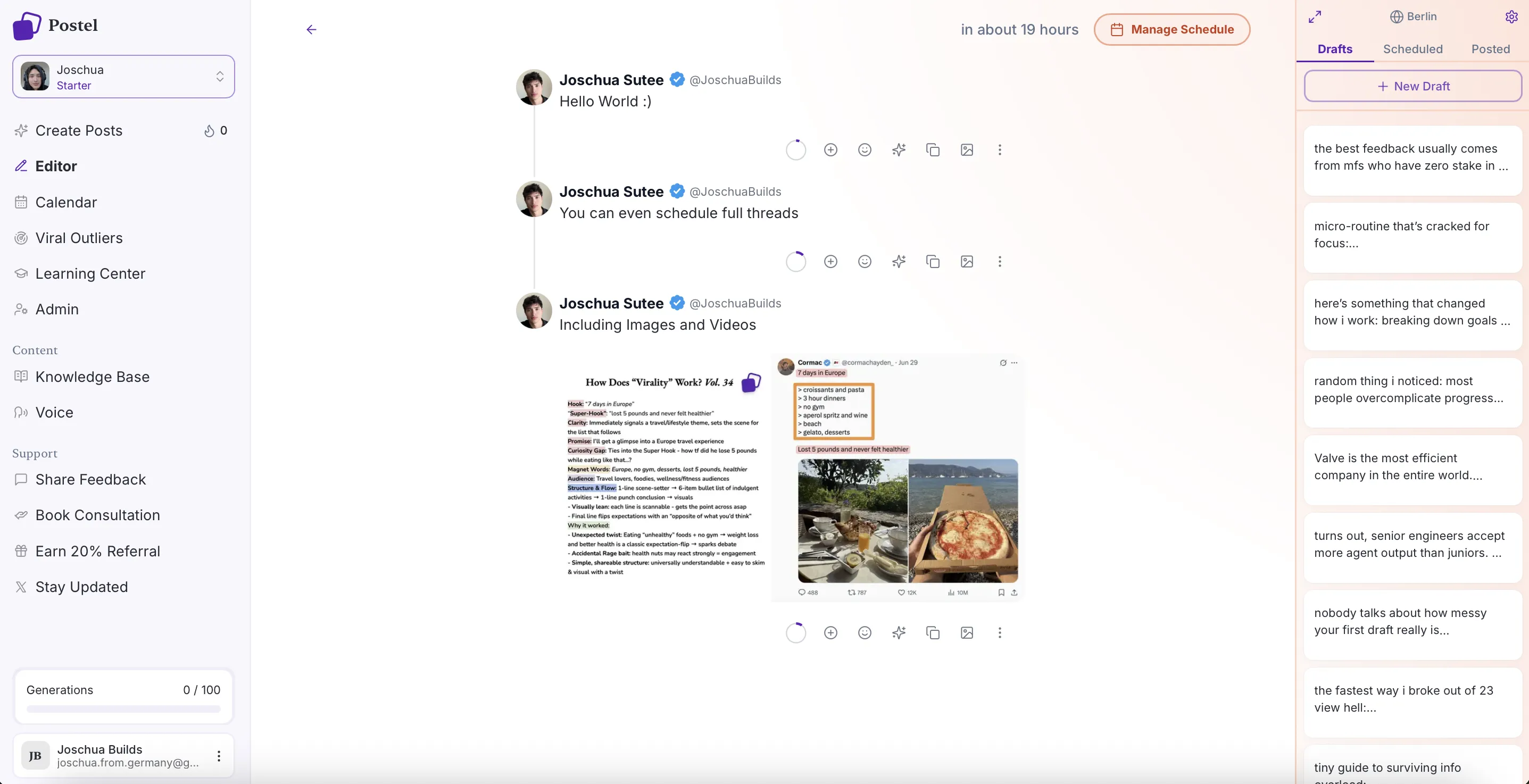
Postel's comprehensive post editor is your command center for creating and scheduling content. The editor supports everything from single posts to complex multi-tweet threads, complete with media attachments.

Postel Editor Full Page View
Editor Capabilities:
- Real-time character counting optimized for X's limits
- Thread creation with automatic post splitting
- Media upload and management (images, videos, GIFs)
- Link previews and attachment support
- AI-powered content suggestions and optimization
- Draft management with full editing capabilities
2. Schedule Full Threads with Media Support
Unlike basic tweet schedulers that only handle single posts, Postel's Twitter post scheduler fully supports scheduling complete threads. Create multi-tweet sequences with videos, images, and links, all scheduled to publish automatically.

Scheduling Threads View
Thread Scheduling Features:
- Schedule entire threads as a single unit
- Attach videos, images, and links to any tweet in the thread
- Automatic thread sequencing and publishing
- Preview complete threads before scheduling
- Edit individual tweets within scheduled threads
3. Schedule to X Communities
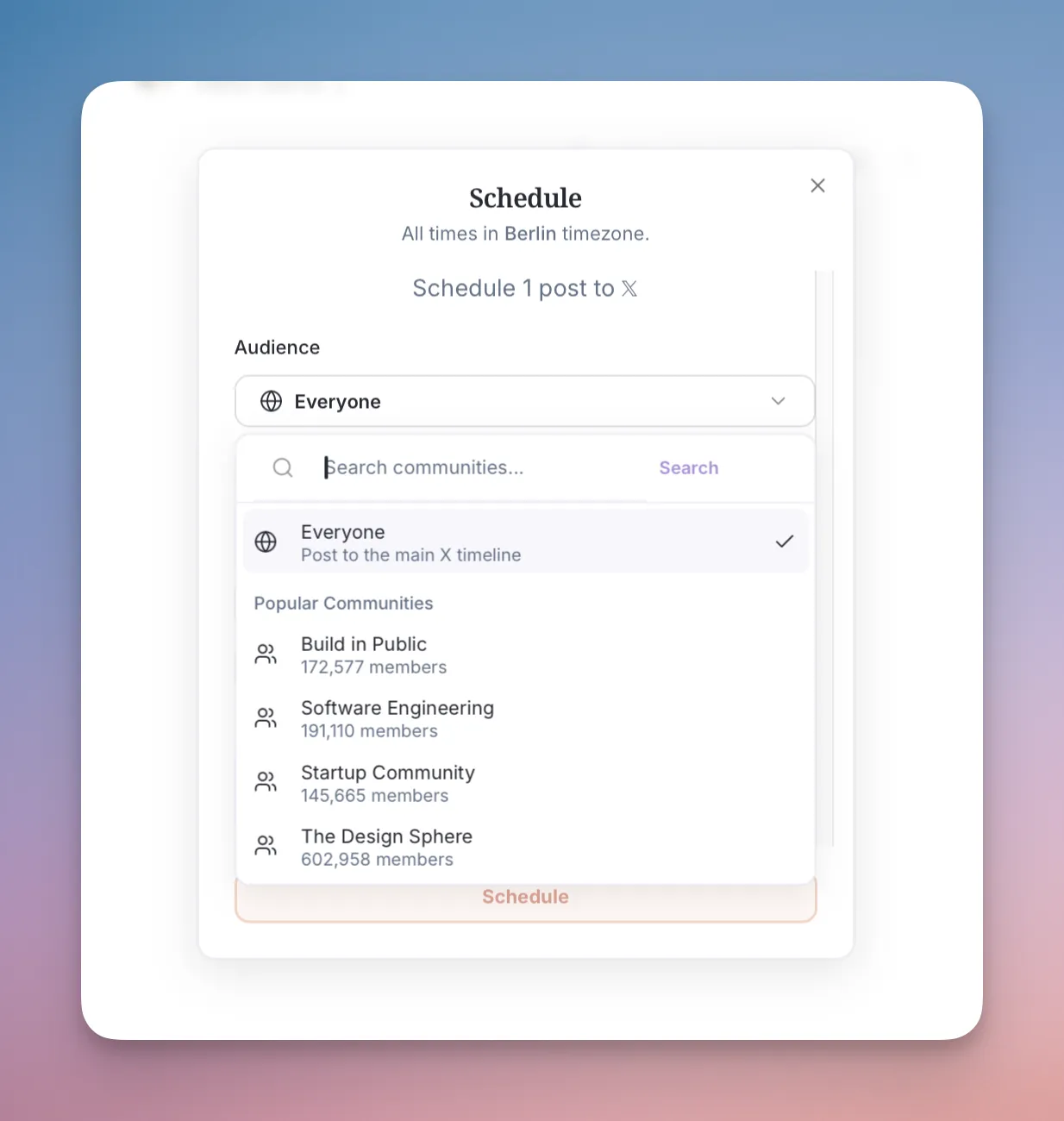
One of Postel's unique features is the ability to schedule posts directly to X Communities. This powerful capability helps you maximize reach and engagement by posting to both your timeline and selected communities simultaneously.

Scheduling to Communities
X Communities Scheduling:
- Schedule posts to multiple X Communities with one click
- Post to timeline and communities simultaneously
- Simple, intuitive interface for community selection
4. Smart Scheduling Slots
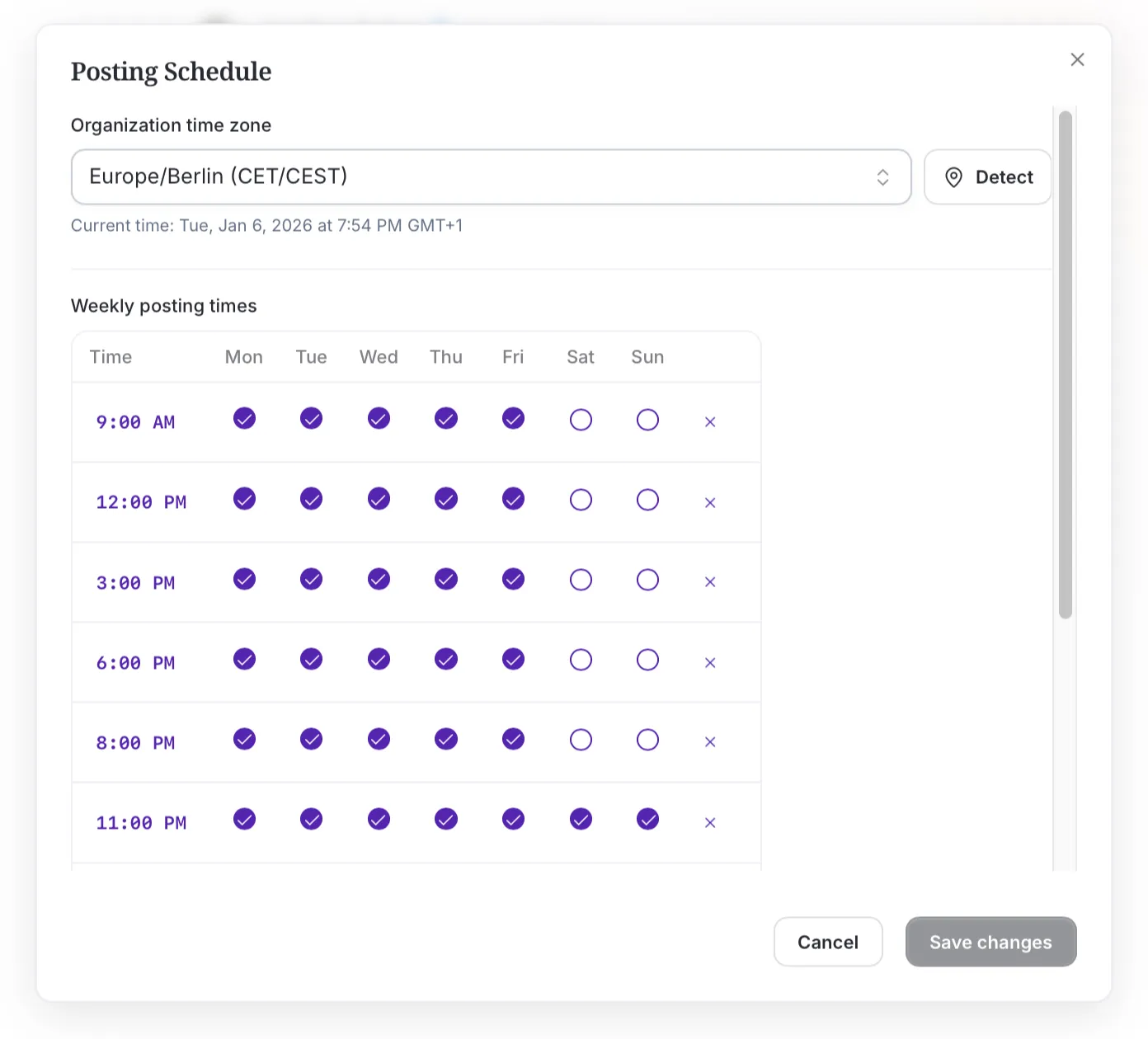
Postel's intelligent scheduling slot system helps you maintain consistent posting without manual time management. Set up your preferred posting times, and Postel automatically manages your schedule.

Scheduling Slots Modal
Scheduling Slots Features:
- Create custom posting time slots
- Automatic slot management and optimization
- Quick "Schedule to Next Available Slot" option
- Bulk scheduling operations
- Slot configuration and management dashboard
5. Schedule to Next Slot (One-Click Scheduling)
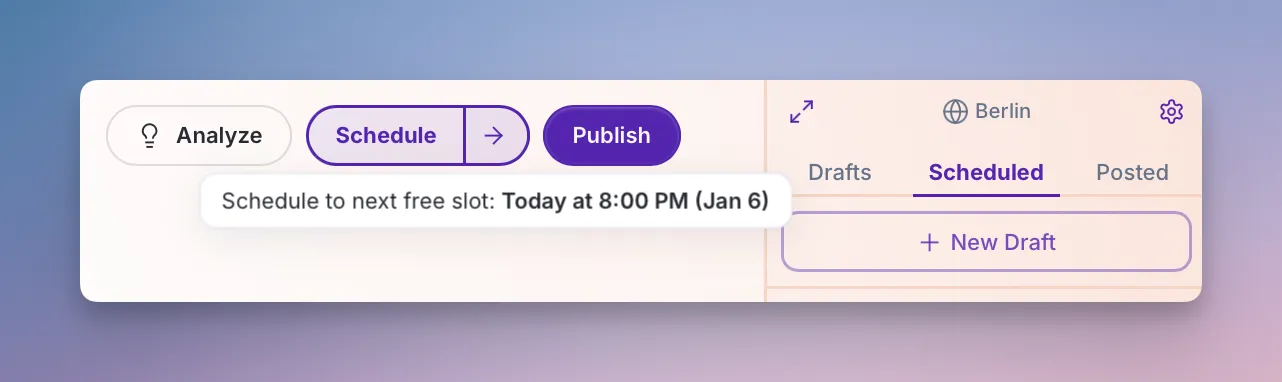
For creators who want to maintain consistency without the hassle, Postel offers instant "Schedule to Next Slot" functionality. With a single click, your post is automatically scheduled to your next available time slot.

Schedule to Next Slot
Benefits:
- One-click scheduling to next available slot
- No manual time selection required
- Maintains consistent posting schedule automatically
- Perfect for busy creators who need quick scheduling
6. Comprehensive Scheduling Calendar
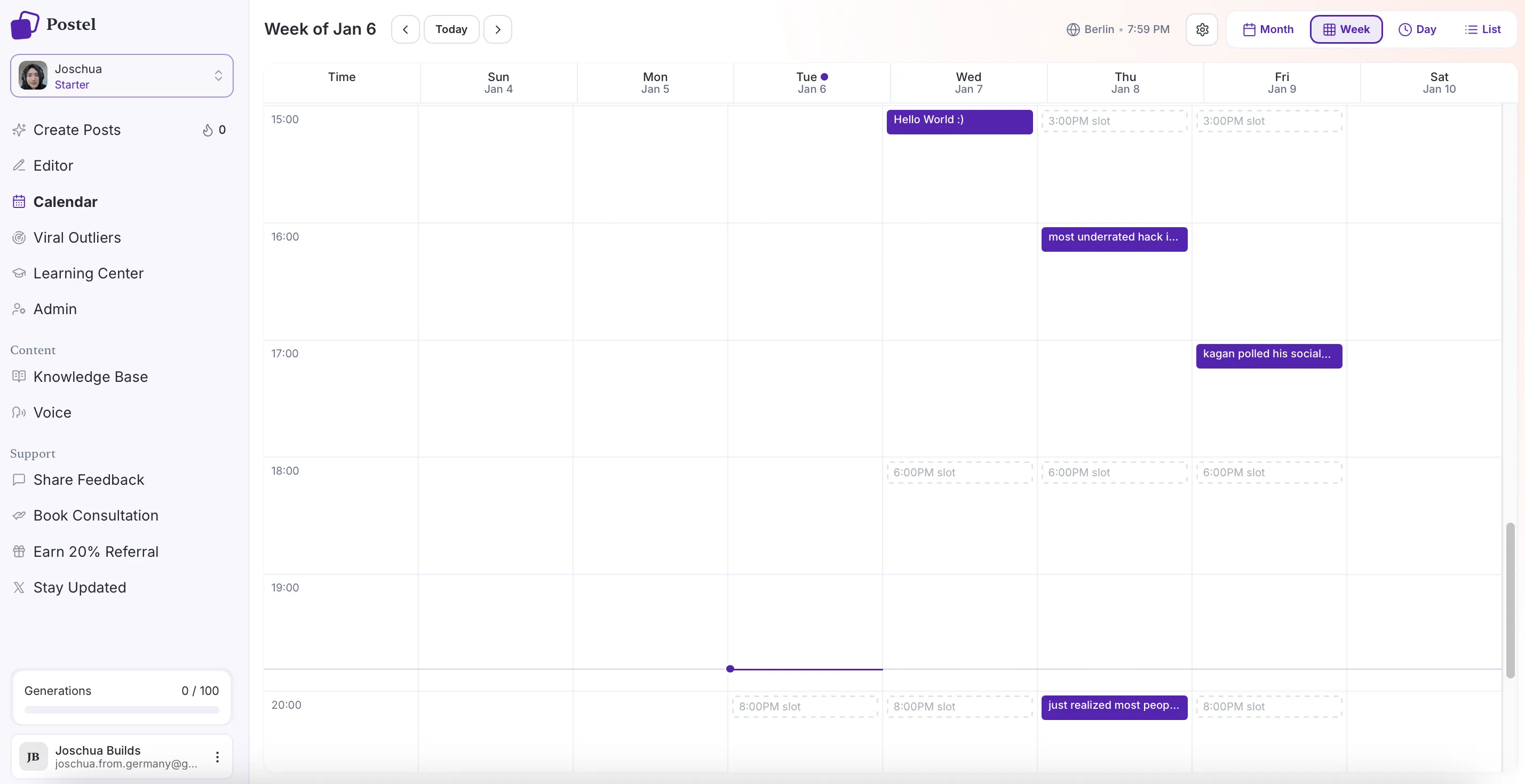
Postel's scheduling calendar provides multiple views to help you visualize and manage your content calendar effectively. Whether you prefer monthly overviews, weekly planning, or a simple list view, Postel has you covered.
Monthly Calendar View
Get a bird's-eye view of your entire month's content schedule. See all scheduled posts at a glance and identify gaps or opportunities in your posting calendar.

Calendar Monthly View
Monthly View Features:
- Complete month overview with all scheduled posts
- Visual indicators for post types (single posts, threads, community posts)
- Quick navigation between months
Weekly Calendar View
Plan your week with precision using the weekly calendar view. See your daily posting schedule and optimize timing for maximum engagement.

Calendar Week View
Weekly View Features:
- Detailed week-by-week planning interface
- Hour-by-hour schedule visualization
- Easy time slot adjustments
- Post preview and quick editing
List View
For creators who prefer a simple, linear view of scheduled content, the list view provides a clean, chronological list of all scheduled posts.
List View Features:
- Chronological list of all scheduled posts
- Quick access to edit or reschedule
- Filter by post type, status, or date range
- Bulk actions for multiple posts
- Search and sort functionality
7. Timezone-Aware Scheduling
Postel's Twitter scheduler automatically handles timezones, ensuring your posts publish at the right time for your audience, regardless of where you are in the world.

Schedule Post Modal
Timezone Features:
- Automatic timezone detection
- Manual timezone selection and management
- Timezone-aware scheduling for global audiences
- Daylight saving time handling
- Multiple timezone support for different accounts
8. Natural Posting Times (Anti-Robotic Scheduling)
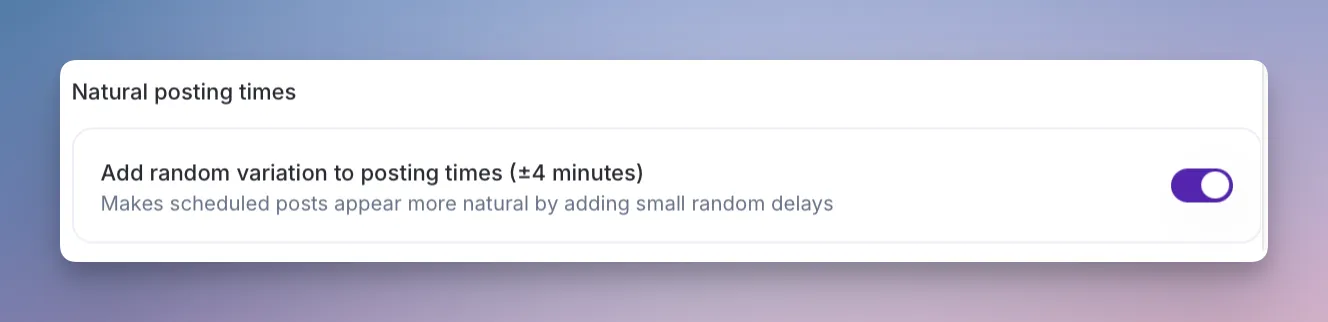
One of Postel's most innovative features is the "Natural Posting Times" option. This feature adds small, randomized time variations to your scheduled posts, making them appear more organic and less robotic, a crucial factor for X's algorithm.

Natural Posting Times Modal
Natural Posting Times Benefits:
- Randomized time variations prevent robotic posting patterns
- More authentic appearance to X's algorithm
- Improved engagement rates from organic-looking posts
- Customizable variation ranges
- One-click enable/disable option
How It Works: When you enable Natural Posting Times, Postel automatically adds small, randomized delays (typically 2-5 minutes) to your scheduled posts. This variation makes your posting pattern appear more human and less automated, which can improve algorithm performance and engagement rates.
9. Direct Publishing Options
Postel's tweet scheduler app doesn't just schedule, it also supports direct publishing. Post immediately to your timeline, create threads on the fly, or publish to X Communities instantly.
Direct Publishing Features:
- Instant publishing to X timeline
- One-click thread publishing
- Immediate community posting
- Real-time publishing status updates
- Publishing history and confirmation
10. Schedule Post Modal & Interface
Postel's scheduling interface is designed for simplicity and efficiency. The schedule post modal provides all scheduling options in one place, making it easy to configure your post's publishing details.
Schedule Modal Features:
- Date and time picker with calendar integration
- Timezone selection and management
- Community selection interface
- Natural posting times toggle
- Schedule to next slot quick action
- Preview before scheduling
- Bulk scheduling options
User Experience & Dashboard Design
Intuitive User Interface
Postel's Twitter post scheduler is built with user experience as a priority. The dashboard is clean, organized, and designed for creators who need to move fast without sacrificing functionality.
UI/UX Highlights:
- Clean, modern interface design
- Intuitive navigation and workflow
- Quick access to all scheduling features
- Visual feedback for all actions
- Responsive design for desktop and mobile
- Keyboard shortcuts for power users
- Drag-and-drop functionality throughout
Easy Usability
Postel makes scheduling as simple as possible. Whether you're scheduling a single post or managing a month's worth of content, the process is streamlined and efficient.
Usability Features:
- One-click scheduling actions
- Bulk operations for multiple posts
- Quick edit and reschedule options
- Visual calendar for easy planning
- Status indicators and notifications
- Helpful tooltips and guidance in the learn center
Comprehensive Dashboard
The Postel dashboard provides a complete overview of your content creation and scheduling workflow. From the dashboard, you can access all scheduling features, view your calendar, manage drafts, and monitor scheduled content.
Dashboard Sections:
- Content creation hub
- Scheduling calendar (monthly/weekly/list views)
- Draft management
- Scheduled posts overview
- Published posts library
- Settings and configuration
Streamline your content creation and grow your business with valuable content
How Postel's Twitter Scheduler Works
Step 1: Create Your Content
Start by creating your post or thread in Postel's editor. Use AI-powered content generation, repurpose from YouTube videos or articles, or write from scratch.
Step 2: Choose Your Scheduling Option
Once your content is ready, you have multiple scheduling options:
- Schedule to Next Slot: One-click scheduling to your next available time
- Custom Schedule: Select specific date and time
- Schedule to Communities: Post to X Communities with timeline
- Direct Publish: Post immediately
Step 3: Configure Scheduling Details
In the schedule modal, configure:
- Date and time (with timezone support)
- Enable Natural Posting Times if desired
- Select X Communities (if applicable)
- Review and confirm
Step 4: Manage Your Schedule
Use the calendar views to:
- Review all scheduled posts
- Reschedule or edit posts
- Identify gaps in your schedule
- Optimize posting times
- Bulk manage multiple posts
Step 5: Automatic Publishing
Postel automatically publishes your scheduled posts at the designated times, handling timezone conversions and natural posting time variations seamlessly.
Answer: Postel's Twitter scheduler works by first creating content in the editor, then choosing a scheduling option (next slot, custom time, or communities), configuring scheduling details like timezone and natural posting times, managing the schedule through calendar views, and finally automatically publishing posts at the designated times.
Integration with Content Creation
Postel's Twitter post scheduler isn't a standalone tool, it's integrated with our complete content creation ecosystem. This seamless integration means you can create, optimize, and schedule content all within one unified platform:
- Transform YouTube Videos, Podcasts, Reels, and Blogs into Posts: Paste any URL and Postel's AI extracts key insights, quotes, and statistics to create 6 personalized posts backed by viral patterns, ready to schedule immediately
- Voice-to-Post Conversion: Built-in speech-to-text functionality transforms spoken ideas into polished posts in real-time, integrated directly into the content creation interface
- Write in Any Creator's Style on X: Train AI on your unique writing style by analyzing your X timeline, or learn from any creator on X. Includes built-in "Jarvis" professional voice trained on thousands of viral tweets
- Analyze Viral Posts and Identify Trends: Browse and analyze thousands of high-performing tweets with filtering by keywords, impression count (50K+ to 1M+), viral multiplier ratios (10x to 200x+), date ranges, and author follower counts
- Build and Leverage Knowledge Base: Store topics, context, and brand information. Transform any knowledge base content into value posts with one click, then schedule immediately
- Draft, Edit, and Schedule Posts: Advanced editor with real-time character counting, thread creation, media management, and AI-powered suggestions, all integrated with scheduling for a complete workflow
Why Choose Postel Over Other Tweet Schedulers?
vs. Generic Social Media Schedulers
Most social media schedulers are built for multiple platforms, which means they don't optimize for X's unique features. Postel is purpose-built for X, with native support for threads, communities, and X-specific best practices.
vs. Basic Tweet Scheduler Apps
Many tweet scheduler apps only handle single posts and basic scheduling. Postel supports full threads with media, X Communities, natural posting times, and advanced calendar management.
vs. Manual Scheduling
Manual scheduling is time-consuming and error-prone. Postel automates the entire process while maintaining the flexibility to customize every aspect of your schedule.
Answer: Postel stands out from other tweet schedulers by being purpose-built for X with native thread support, X Communities integration, natural posting times, and advanced calendar management, features that generic social media schedulers and basic tweet scheduler apps lack.
Streamline your content creation and grow your business with valuable content
Best Practices for Using Postel's Twitter Scheduler
1. Maintain Consistent Posting
Use scheduling slots to maintain a consistent posting schedule. Consistency is key for X algorithm performance and audience growth.
2. Leverage Natural Posting Times
Enable Natural Posting Times to avoid robotic posting patterns. This small feature can significantly improve engagement rates.
3. Schedule to X Communities
Don't just post to your timeline, schedule posts to X Communities to maximize reach and engagement, especially when starting out.
4. Use Multiple Calendar Views
Switch between monthly, weekly, and list views to get different perspectives on your content calendar and identify optimization opportunities.
5. Batch Create and Schedule
Create content in batches and schedule multiple posts at once. This workflow is more efficient than creating and posting one at a time.
6. Plan Around Your Audience
Use timezone-aware scheduling to ensure your posts publish at optimal times for your target audience, regardless of your location.
7. Schedule Full Threads
Take advantage of Postel's thread scheduling capabilities. Threads often perform better than single posts and can be scheduled as complete units.
Answer: Best practices for using Postel's Twitter scheduler include maintaining consistent posting with scheduling slots, leveraging natural posting times to avoid robotic patterns, scheduling to X Communities for maximum reach, using multiple calendar views for planning, batch creating and scheduling content, planning around your audience with timezone-aware scheduling, and scheduling full threads for better performance.
Getting Started with Postel's Twitter Post Scheduler
Postel is one of the best tweet schedulers available, offering a complete schedule Twitter posts app experience. Here's how to get started:
Quick Start Guide
- Sign Up: Create your free Postel account at postel.app
- Connect X Account: Link your X account for direct publishing
- Set Up Scheduling Slots: Configure your preferred posting times
- Create Your First Post: Use the editor to create content
- Schedule: Choose your scheduling option and configure details
- Monitor: Use calendar views to manage your scheduled content
Free Trial
Postel offers a 7-day free trial with full access to all Pro features, including advanced scheduling capabilities. Start scheduling your X content today.
Pricing & Plans
Starter Plan
Perfect for creators just starting to grow their audience on X.
- $19/month (billed yearly) or $29/month (billed monthly)
- Knowledge Base
- Write Like Any Creator From X (Twitter)
- Access To All Content Creation Flows
- Tone Of Voice Analysis
- Rich-text Editor With Media & AI Writing
- Analyse Posts to Predict Performance
- Browse & Filter Viral Outliers
Professional Plan
Ideal for founders and professionals ready to scale their audience and grow their business faster.
- $29/month (billed yearly) or $49/month (billed monthly)
- Everything in Starter
- 3x More Usage
- Priority Support
- Personal Onboarding with the Founders
- Monthly Strategy Calls
Streamline your content creation and grow your business with valuable content
Frequently Asked Questions
Is Postel a good Twitter post scheduler?
Yes, Postel is specifically designed as a Twitter post scheduler and X post scheduler with native X integration, full thread support, X Communities scheduling, and advanced features like natural posting times. It's purpose-built for X, not adapted from a generic social media scheduler.
Can I schedule threads with Postel?
Absolutely. Postel's tweet scheduler fully supports scheduling complete threads with videos, images, and links. You can schedule entire multi-tweet sequences as a single unit.
Does Postel support X Communities?
Yes, Postel allows you to schedule posts directly to X Communities with one click. You can post to your timeline and selected communities simultaneously.
What is Natural Posting Times?
Natural Posting Times is a Postel feature that adds small, randomized time variations to scheduled posts, making them appear more organic and less robotic. This can improve engagement rates and algorithm performance.
Can I schedule posts in different timezones?
Yes, Postel's Twitter scheduler includes full timezone support. You can set your timezone, and Postel automatically handles conversions and daylight saving time adjustments.
How do scheduling slots work?
Scheduling slots are predefined posting times you can configure. Postel can automatically assign posts to your next available slot, or you can manually select specific slots when scheduling.
Can I reschedule posts?
Yes, you can easily reschedule any post from the calendar views. Simply select the post and choose a new date and time, or use the "Schedule to Next Slot" option.
Does Postel support bulk scheduling?
Yes, Postel supports bulk scheduling operations, allowing you to schedule multiple posts at once with shared settings and configurations.
Start Scheduling Your X Content Today
Postel is the most comprehensive Twitter post scheduler and X post scheduler available. As one of the best tweet schedulers on the market, Postel combines the power of a full-featured tweet scheduler app with advanced content creation tools. With features like full thread scheduling, X Communities integration, natural posting times, and multiple calendar views, Postel gives you everything you need to maintain a consistent, high-performing content schedule on Twitter/ X.
Related Resources:
- What is Postel
- How to Write Better Tweets
- How to Increase Impressions on X
- Postel vs Tweet Hunter Comparison
Postel is the best tweet scheduler app for content creators who want to maintain consistent, high-quality posting on Twitter/ X while saving time and maximizing engagement. Start your free trial today and experience the difference a purpose-built Twitter scheduler can make.