












Quote posts (formerly "retweets with comment") let you share someone else's content while adding your perspective. The original post appears embedded below your commentary, giving your followers context while showcasing your thoughts. Here's how to create effective quote posts on X.
How to Quote a Tweet
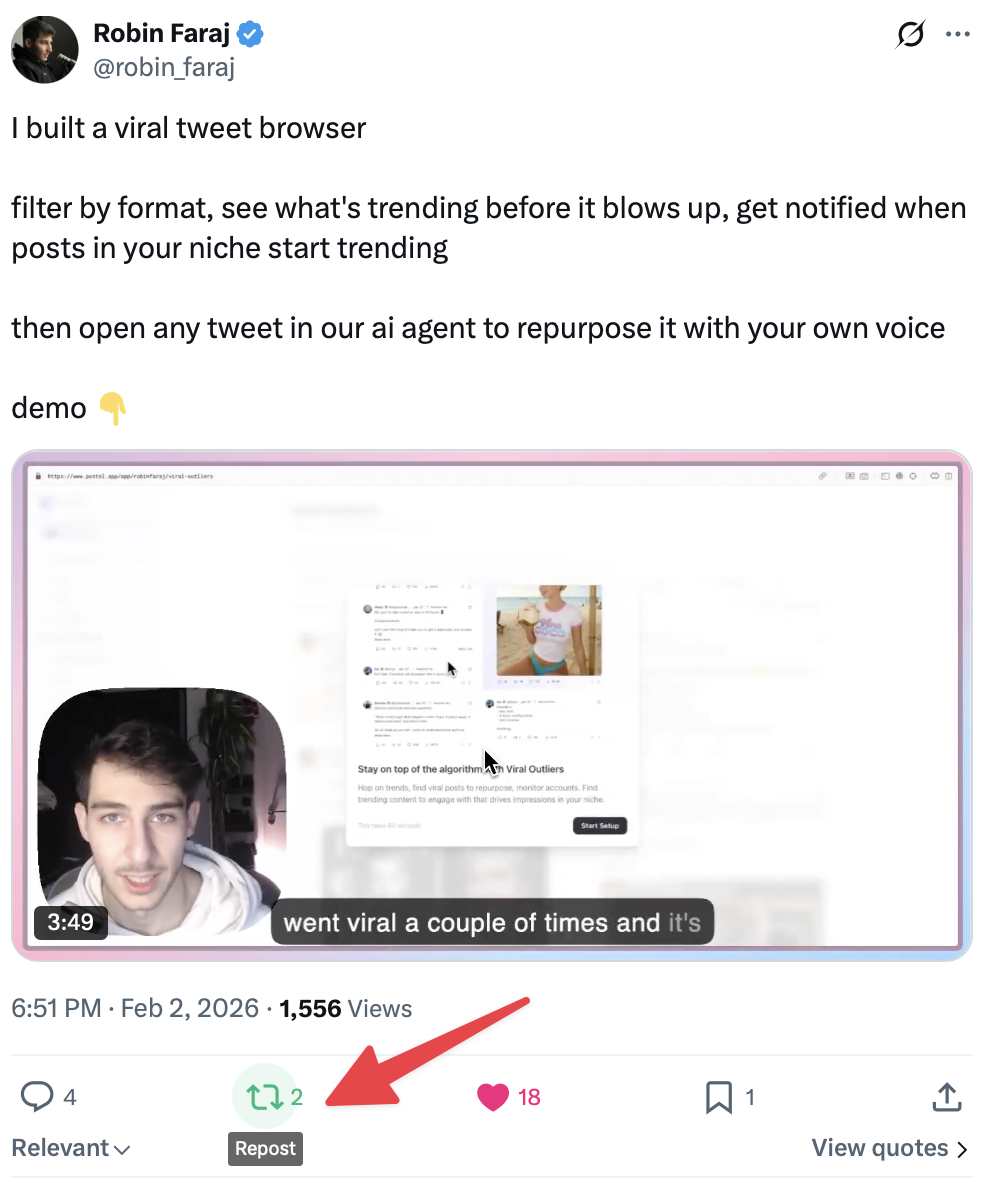
On Desktop
- Find the post you want to quote
- Click the repost icon (two arrows forming a square)
- Select "Quote" from the dropdown menu
- Write your commentary in the text box
- Optionally add images, GIFs, videos, or polls
- Click "Post" to publish
On Mobile
- Find the post in your timeline or through search
- Tap the repost icon
- Select "Quote" from the options
- Add your commentary (280 characters max)
- Add optional media
- Tap "Post"
The process is identical across iOS and Android.
Alternative Method: Copy and Paste Link
If the quote option doesn't appear:
- Tap the share icon on the original post
- Select "Copy link"
- Create a new post
- Paste the link
- Write your commentary above it
- Post
X automatically embeds the linked tweet, creating the same quote effect.
Understanding Quote Posts
What Appears in a Quote
Your quote post includes:
- Your commentary text
- Any media you add
- The original post embedded below, showing:
- Original author's name and handle
- Original text
- Original media (images, videos)
- Original post's engagement metrics
Character Limits
You have 280 characters for your commentary (or up to 25,000 with X Premium). The quoted content doesn't count against your limit.
Media Options
Along with your commentary, you can add:
- Up to 4 images
- One video
- One GIF
- One poll
These appear above the quoted tweet.
Quote vs. Repost vs. Reply
Understanding when to use each:
Repost (Retweet)
- What it does: Shares the exact original post to your timeline
- Best for: Content you endorse without additional commentary
- Visibility: Your followers see the original author's post
- Your presence: Minimal - just a "Reposted by [you]" note
Quote
- What it does: Creates a new post with the original embedded
- Best for: Adding commentary, disagreement, or context
- Visibility: Your followers see your post with the original embedded
- Your presence: Primary - you're the author with quoted reference
Reply
- What it does: Responds directly to the original post
- Best for: Engaging in conversation with the author
- Visibility: Appears in the reply thread, not your main timeline
- Your presence: Contextual - part of a conversation
When to Use Quote Posts
Quotes work well when you want to:
Add value:
- Provide additional context
- Share your expert perspective
- Highlight why something matters
Express opinion:
- Agree and amplify
- Respectfully disagree
- Offer a different angle
Engage your audience:
- Start discussions
- Ask questions about the content
- Connect different ideas
Curate content:
- Share interesting finds with commentary
- Build on trending conversations
- Reference while creating original content
Quote Post Best Practices
Add Meaningful Commentary
Avoid empty quotes like "This" or "Interesting." Instead:
Weak: "This." Strong: "This challenge with shipping deadlines is why we moved to continuous deployment. Our release anxiety dropped 80%."
Respect the Original Author
Even when disagreeing:
- Don't misrepresent their position
- Engage with their actual argument
- Avoid personal attacks
Consider Your Audience
Your followers follow you for your perspective. Quote posts should provide value through your lens, not just amplify content without addition.
Use Quotes Strategically
Too many quotes make your timeline feel like curation rather than creation. Balance quoted content with original posts.
When You Cannot Quote
Several situations prevent quoting:
Private accounts: Content from protected accounts cannot be quoted
Blocked users: You cannot quote posts from accounts that blocked you
Limited replies: Some users restrict who can interact with their posts
Deleted content: Deleted posts cannot be quoted
Suspended accounts: Content from suspended users is unavailable
Viewing Who Quoted Your Post
To see quotes of your content:
- Tap on your original post
- Look for "Quotes" in the engagement metrics
- Tap to see all quote posts
This shows you how others are discussing your content.
Quote Posts for Engagement
Quotes often generate more discussion than simple reposts because:
- Your perspective invites response: Followers engage with your take
- Original author may respond: Creates conversation opportunities
- Two audiences combine: Your followers and the original poster's may interact
Use Postel's AI tweet writer to craft compelling commentary for your quote posts.
Frequently Asked Questions
Does the original author get notified when I quote their post?
Yes. X notifies users when their posts are quoted. They can see your quote in their notifications.
Can I edit a quote post after publishing?
With X Premium, you can edit posts including quote posts within 60 minutes. The quoted content remains unchanged.
What happens if the original post is deleted?
Your quote post remains, but the embedded section shows "This post is unavailable" or similar message.
Can I quote my own posts?
Yes. Quoting your own previous posts can reference past content while adding new thoughts.
Do quote posts count as engagement for the original author?
Quotes don't directly count in the original's like/repost numbers, but they drive visibility and can bring engagement to the original post indirectly.
Quote posts are powerful tools for adding your voice to conversations while giving credit to original content. Use them to provide value, share perspectives, and build on ideas rather than simply amplifying without contribution.