












Finding a specific post from someone's X (formerly Twitter) account doesn't require scrolling through thousands of tweets. X provides powerful search operators that filter results by account, date, keywords, and engagement. Here's how to find exactly what you're looking for.
Basic Search: The "from:" Operator
The most important operator for searching someone's tweets:
from:username keyword
Example: Find posts from Elon Musk about Tesla:
from:elonmusk Tesla
This returns all posts from @elonmusk containing "Tesla."
Key points:
- Don't include the @ symbol
- Username is case-insensitive
- Add keywords after the username to filter
Using Advanced Search (Web Only)
X's full Advanced Search interface is available on the web:
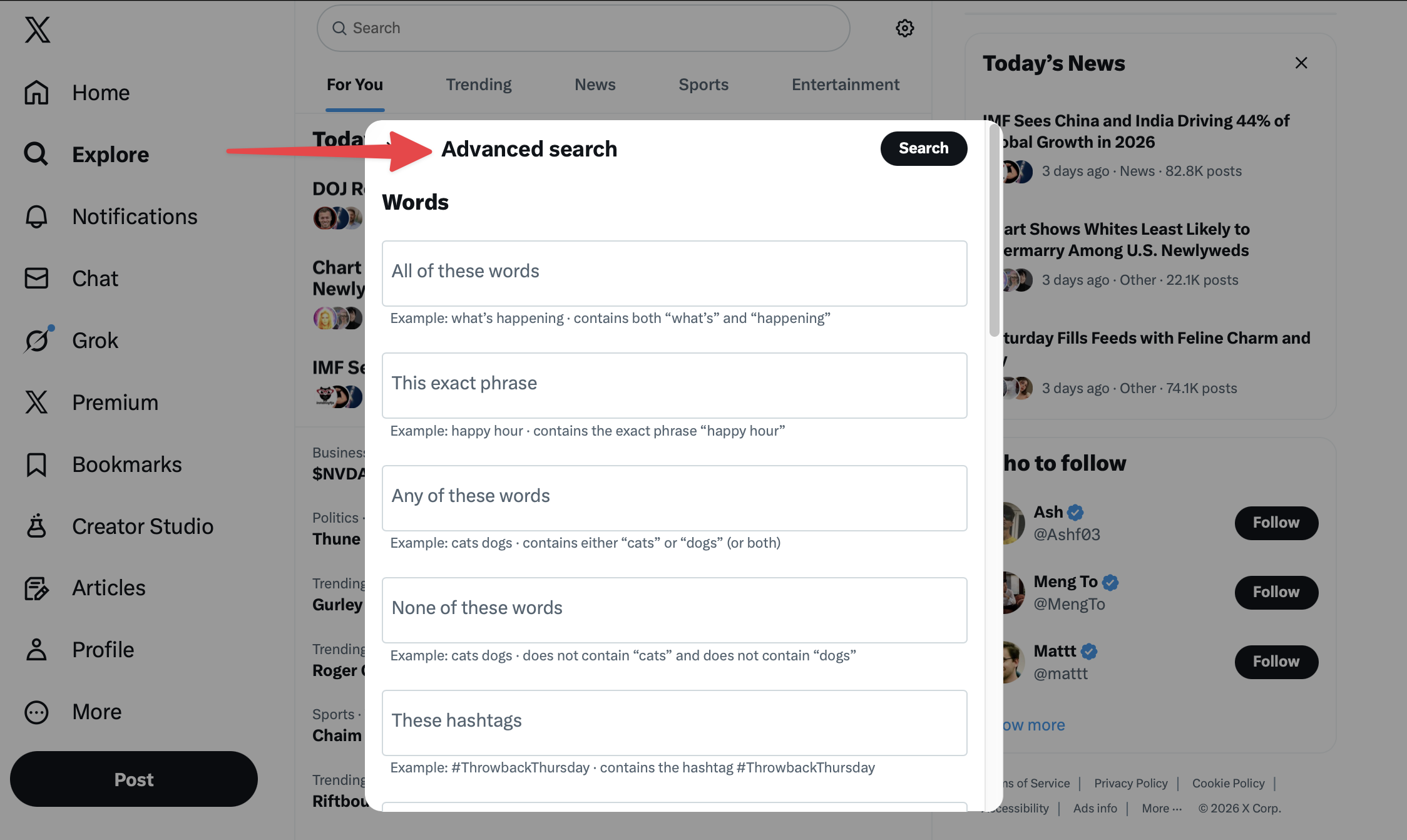
- Go to X on a desktop browser
- Perform any search
- Click the three dots next to the search bar
- Select "Advanced search"
Advanced Search fields:
- All of these words
- This exact phrase
- Any of these words
- None of these words
- These hashtags
- From these accounts
- To these accounts
- Mentioning these accounts
- Date range
- Minimum engagement
Fill in the fields to build complex queries without memorizing operators.
Search Operators Reference
Account-Based Operators
from:username - Posts from a specific account
from:NASA space launch
to:username - Replies to a specific account
to:NASA question
@username - Posts mentioning an account
@NASA rocket
Date-Based Operators
since:YYYY-MM-DD - Posts after a date
from:username since:2025-01-01
until:YYYY-MM-DD - Posts before a date
from:username until:2024-12-31
Combined for date range:
from:username since:2025-01-01 until:2025-06-30
Engagement Operators
min_retweets:n - Minimum reposts
from:username min_retweets:100
min_faves:n - Minimum likes
from:username min_faves:500
min_replies:n - Minimum replies
from:username min_replies:50
Content Filters
filter:media - Only posts with images/videos
from:username filter:media
filter:images - Only posts with images
from:username filter:images
filter:videos - Only posts with videos
from:username filter:videos
filter:links - Only posts with links
from:username filter:links
-filter:replies - Exclude replies
from:username -filter:replies
Phrase and Word Operators
"exact phrase" - Match exact phrase
from:username "product launch"
word1 OR word2 - Match either word
from:username apple OR google
-word - Exclude word
from:username technology -crypto
Mobile Search Techniques
Advanced Search isn't available in the X app directly, but operators work:
Profile Search on Mobile
- Open someone's profile
- Tap the search icon in their header
- Enter keywords
- Results show only posts from that account
This is the easiest mobile method for account-specific searches.
Operator Search on Mobile
Type operators directly in the main search bar:
from:username keyword
The app processes operators the same as the web version.
Common Search Scenarios
Finding Old Posts
Search within a date range:
from:username since:2020-01-01 until:2020-12-31
Finding Popular Content
Search by engagement:
from:username min_faves:1000
Finding Posts About a Topic
Combine account and keywords:
from:username "product launch" OR "new feature"
Finding Replies to Specific Users
Search for conversations:
from:username to:otherusername
Finding Posts with Media
Visual content only:
from:username filter:media since:2025-01-01
Limitations to Know
The 3,200 Post Limit
X's API only allows access to approximately the most recent 3,200 posts from any account. Older posts may not appear in search results.
Workaround: Use date filters to search specific periods:
from:username since:2019-01-01 until:2019-06-30
Private Accounts
You cannot search posts from private accounts unless you follow them and are logged in.
Deleted Posts
Deleted posts don't appear in search results. They're removed from X's index.
Rate Limiting
Heavy search activity may trigger temporary restrictions. Space out searches if you encounter errors.
Third-Party Search Tools
Several services enhance X search capabilities:
Benefits:
- Archive access beyond 3,200 posts
- Export functionality
- Analytics on results
- Monitoring and alerts
Considerations:
- Some require paid subscriptions
- API access may be limited
- Terms of service compliance varies
Tips for Effective Searching
- Start broad, then narrow: Begin with just the username, then add filters
- Use date ranges: Narrow time periods improve result relevance
- Combine operators: Multiple conditions create precise searches
- Check spelling: Operators are case-sensitive for syntax (from: not FROM:)
- Try synonyms: Authors might use different words for the same concept
Frequently Asked Questions
Can I search deleted tweets?
No. Once deleted, posts are removed from X's search index. Archive services like the Wayback Machine may have captured them before deletion.
Why don't I see all results?
X's search has limitations including the 3,200 post cap and relevance filtering. Very old posts may not be indexed for search.
Can I search DMs?
No. Direct messages are private and not included in search functionality.
How do I search my own tweets?
Use the same operators with your username:
from:yourusername keyword
Or use your profile's search icon on mobile.
Can I save searches?
Yes. Perform a search, tap the three dots, and select "Save this search." Saved searches appear in your search history for quick access.
X's search operators transform the platform into a powerful research tool. Whether finding old posts, tracking popular content, or researching specific topics, these techniques help you find exactly what you're looking for without endless scrolling.