












The question "Can you see who viewed your X profile?" has a definitive answer: No. X (formerly Twitter) intentionally does not provide this information, and no legitimate third-party tool can access it either. Here's what you can actually see and why the platform made this design choice.
Why X Doesn't Show Profile Viewers
X prioritizes user privacy over curiosity. The platform believes users should browse freely without worrying that their viewing habits are being tracked and reported to others.
This stance differs from platforms like LinkedIn, which shows profile views as a networking feature. X views itself as a public conversation platform where anonymous browsing should remain possible.
The platform's API also doesn't support profile viewer data. This means even developers cannot build legitimate tools to access this information.
What Analytics Data IS Available
While you can't see who viewed your profile, X does provide aggregate profile visit data through its analytics dashboard.
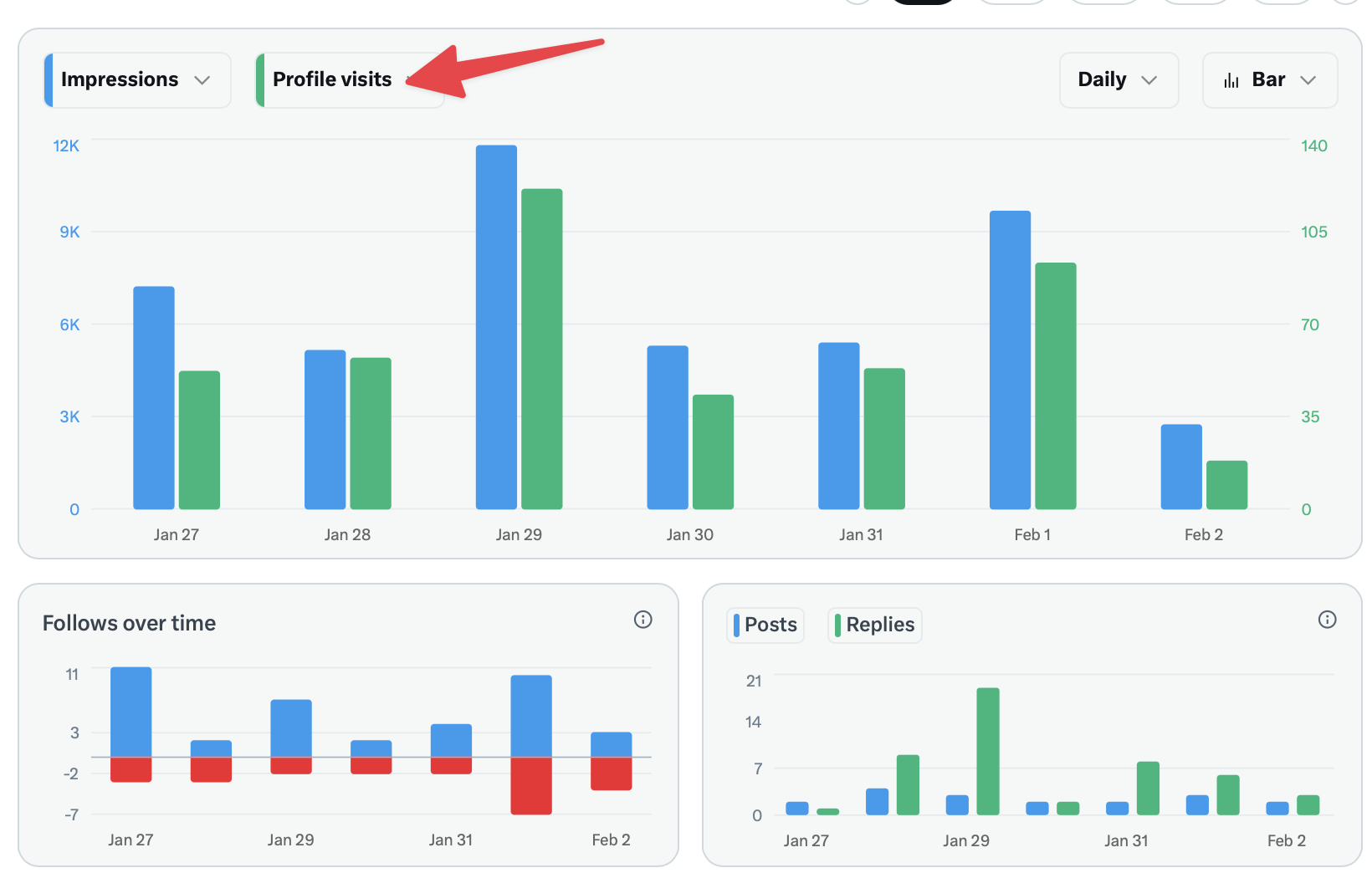
Profile Visits Metric:
- Shows the total number of unique visitors to your profile
- Counted daily with 28-day historical data
- Doesn't count your own visits
- Multiple visits from the same user in one day count as one
How to Access Profile Analytics:
- Open the X app or website
- Navigate to your profile
- Tap on any of your posts
- Click the bar graph icon (analytics icon)
- View the metrics including profile visits
Available Metrics Include:
- Impressions (how many times your content was seen)
- Engagements (likes, replies, reposts)
- Profile visits from that specific post
- Engagement rate
- Link clicks (if applicable)
For full analytics access, you need X Premium. Free accounts only see basic engagement counts on individual posts.
Understanding Profile Visit Data
The profile visits metric tells you quantity, not identity. You can see that 500 people visited your profile this week, but you'll never know who those 500 people were.
This data is useful for:
- Measuring content effectiveness: High-performing posts drive profile visits
- Tracking growth trends: Monitor whether your audience is expanding
- Optimizing posting times: Correlate post timing with profile visit spikes
- Evaluating campaign performance: See if promotional efforts drive traffic
Third-Party Apps That Claim to Show Viewers
Multiple apps and websites claim they can reveal who viewed your X profile. Every single one of these is either a scam or deceptive.
Why they don't work:
- X's API doesn't provide this data to anyone
- These apps have no technical means to access viewer information
- They often request your login credentials (which they may steal)
- Some install malware or sell your data
Red flags to watch for:
- Requests for your X password
- Promises to show "stalkers" or "secret admirers"
- Requirements to share posts or follow accounts
- Pop-up ads and suspicious redirects
If an app could actually show profile viewers, it would be major news. The absence of coverage from legitimate tech publications tells you these claims are false.
What CAN Indicate Someone Viewed Your Profile
While you can't confirm specific viewers, certain signals suggest someone looked at your profile:
Direct indicators:
- They followed you
- They liked multiple older posts
- They replied to an old post
- They sent you a direct message
Circumstantial indicators:
- They mentioned you in a post
- They quoted one of your posts
- Mutual followers mentioned connecting you
None of these confirm someone viewed your profile, but they suggest some level of interest.
LinkedIn vs. X: Different Approaches
LinkedIn shows profile viewers because networking is its core purpose. Knowing who viewed your profile helps you identify potential connections, recruiters, or business opportunities.
X takes the opposite approach. The platform wants users to feel comfortable following discussions, reading posts, and exploring profiles without the social pressure of being tracked.
This difference reflects each platform's purpose:
- LinkedIn: Professional networking where visibility matters
- X: Public discourse where anonymous observation has value
How to Increase Profile Visits
Since you can track total visits, you can work to increase this number:
Content strategies:
- Post consistently to stay visible in feeds
- Create engaging content that prompts curiosity about you
- Use your bio effectively to encourage profile visits
- Pin your best post to give visitors a strong first impression
Engagement strategies:
- Reply thoughtfully to popular posts
- Participate in conversations in your niche
- Quote post with valuable additions
- Engage with accounts whose audiences you want to reach
Use Postel's AI tweet writer to create engaging content that drives profile visits.
Privacy Considerations
The inability to see profile viewers protects your privacy too:
- You can research competitors without alerting them
- You can browse potential business partners anonymously
- You can follow controversial topics without being tracked
- You can check on people without social implications
This mutual privacy benefits all users equally.
Frequently Asked Questions
Do third-party Twitter analytics tools show who viewed my profile?
No legitimate analytics tool shows specific profile viewers. X Analytics and third-party social media management tools can show aggregate metrics like total profile visits, but none can identify individual viewers.
If I view someone's profile frequently, will they know?
No. Your viewing activity remains completely private. They may see increased profile visits in their analytics, but they cannot identify you as the source.
Does X Premium show who viewed your profile?
No. X Premium provides enhanced analytics and features, but it does not include viewer identification. This limitation exists at the platform level and applies to all users regardless of subscription status.
Can businesses see who viewed their X profile?
No. Business accounts have the same limitations as personal accounts. They can see total profile visits but not individual viewer identities.
Why do some apps claim to show profile viewers?
These apps exploit user curiosity for profit. They may collect personal data, install malware, or require actions that benefit the app creator (like following accounts or sharing posts). None can actually deliver on their promises.
X's decision not to reveal profile viewers reflects a privacy-first approach to social media. While you can track how many people visit your profile, knowing who specifically viewed it isn't possible through any legitimate means. Focus on creating great content that naturally attracts profile visits rather than trying to identify individual viewers.