












X (formerly Twitter) doesn't send notifications when someone blocks you. The platform keeps blocking private to protect user privacy. However, you can discover if a specific person has blocked you through several methods. Here's how to check and what blocking actually means.
What Happens When Someone Blocks You
When an account blocks yours, several things change:
- You can't see their posts: Their content disappears from your timeline
- You can't follow them: The follow button becomes inactive
- You can't message them: DMs are blocked
- Your interactions disappear: They won't see your replies or mentions
- Search limitations: Their account may not appear in your searches
Blocking is mutual invisibility. They can't see your content either, unless they log out or use a different account.
Method 1: Visit Their Profile Directly
The most straightforward way to check:
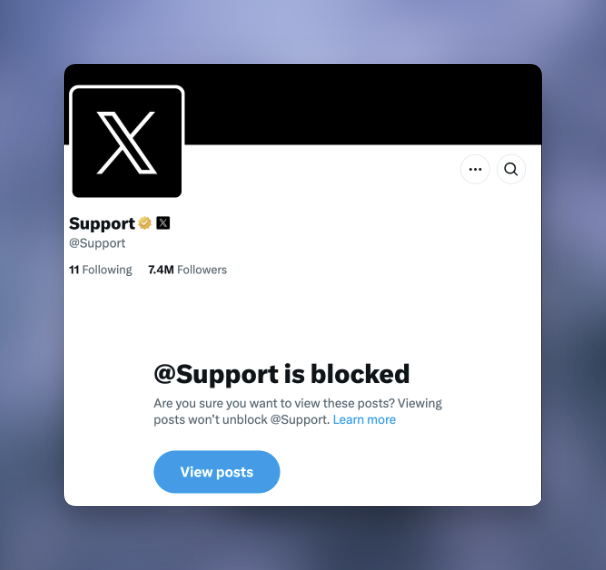
- Search for the person's username
- Navigate to their profile (or enter twitter.com/username directly)
- If blocked, you'll see: "You're blocked. You can't follow or see their posts."
This message confirms the block definitively.
If you see the message:
- Their display name and username appear
- Profile picture may or may not show
- No posts, followers, or following counts visible
- No option to follow or interact
Method 2: Try to Send a Direct Message
Attempting to DM someone who blocked you reveals the restriction:
- Open your messages
- Start a new conversation
- Search for their username
- Try to compose a message
If blocked, X displays an error indicating you cannot message this account.
Method 3: Search for Their Username
X hides blocked accounts from your search results:
- Use the search bar
- Type their exact username
- Check if their profile appears in results
If they blocked you, their account won't appear in your searches, even if you spell the username correctly. Note: This method isn't definitive. They might have deactivated or changed their username.
Method 4: Use the Direct URL
Access their profile through a direct link:
- Open a browser
- Type:
x.com/username(replace username with their handle) - Press Enter
If blocked, the block message appears. If the account doesn't exist, you'll get a different error ("This account doesn't exist").
Method 5: Check from a Logged-Out State
Compare what you see logged in versus logged out:
- Open an incognito/private browser window
- Navigate to their profile
- Compare with what you see while logged in
If blocked:
- Logged out: You see their profile and posts (if public)
- Logged in: You see the block message
If not blocked:
- Both views show the same content
Signs You Might Be Blocked
Circumstantial evidence that suggests blocking:
- Sudden silence: Someone who frequently interacted with you stops entirely
- Missing from notifications: You no longer see their likes or replies
- Conversations disappear: Reply threads you participated in seem incomplete
- Mutual friends mention them: But you can't find their content
These signs suggest blocking but don't confirm it. The person might have:
- Deactivated their account
- Changed their username
- Made their account private
- Simply stopped using X
Can You See a List of Everyone Who Blocked You?
Short answer: No.
X doesn't provide this feature. You can only check specific accounts one by one.
Third-party tools: Some services claim to show who blocked you. Approach these with caution:
- Most require account access (risky)
- Many violate X's terms of service
- Results may be inaccurate
- Some are scams collecting credentials
If you use third-party tools, research them thoroughly and never share your password.
What Blocking Doesn't Do
Common misconceptions about blocking:
Blocking doesn't:
- Delete previous interactions (likes, replies remain unless manually deleted)
- Prevent mentions in posts they won't see
- Stop you from viewing their content while logged out
- Remove you from their followers (you're automatically unfollowed)
- Notify them if you check their profile
Blocking does:
- Create mutual invisibility while logged in
- Prevent all direct interaction
- Remove existing follow relationship
Should You Try to Bypass a Block?
Creating a new account to follow or interact with someone who blocked you violates X's rules. This can result in:
- Suspension of your new account
- Potential suspension of your main account
- Reports for harassment
Respect blocks. If someone doesn't want to interact with you, pursuing them creates problems for both parties.
How to Block Someone Yourself
If you want to block an account:
- Visit their profile
- Tap the three dots (overflow menu)
- Select "Block @username"
- Confirm the action
Blocked accounts:
- Cannot see your posts
- Cannot follow you
- Cannot message you
- Won't appear in your notifications
You can unblock someone anytime through Settings > Privacy and Safety > Blocked Accounts.
Frequently Asked Questions
If I unblock someone, do they know?
No. X doesn't notify users when they're unblocked. However, they won't automatically follow you again. They'd need to manually refollow if they discover the unblock.
Can blocked accounts see my public posts?
Not while logged into their blocked account. However, if they log out or use a different account, your public posts are visible. Blocking provides logged-in privacy, not absolute invisibility.
Does blocking remove existing DM conversations?
No. Previous DM conversations remain in both inboxes. However, neither party can send new messages while the block is active.
If someone blocked me, can I see their profile in search results?
No. When someone blocks you, their account is hidden from your search results, timeline, and recommendations while you're logged in.
How do I know if a celebrity blocked me specifically?
The same methods apply: visit their profile directly or use the URL method. If you see the "You're blocked" message, they (or their team) specifically blocked your account.
X keeps blocking private to protect user autonomy. While you can check if specific accounts have blocked you, there's no way to see a comprehensive list. If someone blocks you, respect their decision. Attempting to circumvent blocks violates platform rules and can result in account suspension.