












What Postel's LinkedIn Scheduler Does
- Schedules to your personal LinkedIn profile. Connect LinkedIn once in Settings > Channels and publish or schedule from the editor.
- Handles the formats LinkedIn posts use. Text up to 3,000 characters with up to 20 images, one MP4 video, or one document with a title (the format most people call a carousel).
- Posts a first comment for you. Add an optional first comment, for example the link you kept out of the post body.
- Shows the post before it goes out. The editor has a LinkedIn preview and marks where the "see more" fold cuts your text.
- Fills a weekly posting schedule. Set your posting times once, then send each new post to the next free slot.
- Keeps X and LinkedIn in one calendar. Filter the calendar, the post library and your slots by platform.
- Writes in your voice. Postel learns how you write from a public LinkedIn profile and drafts posts that sound like you.
Streamline your content creation and grow your business with valuable content
How to Schedule a LinkedIn Post with Postel
Step 1: Connect your LinkedIn profile
Open Settings > Channels and connect LinkedIn. You approve the connection on LinkedIn's own consent screen. The workspace owner makes the connection.
Step 2: Write or generate the post
Switch the platform toggle to LinkedIn. Write the post yourself, or describe the idea and let Postel draft it in your voice. You can also paste a YouTube video, podcast or article link and turn it into a post.
Step 3: Add media and a first comment
Attach up to 20 images, one MP4 video or one document (PDF, PowerPoint or Word). Pasted links get a preview card. If you want a comment under your own post, type it in the first comment field.
Step 4: Check the preview
Look at the LinkedIn preview and the fold marker. The first lines above "see more" decide whether people keep reading, so check that the hook sits above the fold.
Step 5: Pick a time or the next slot
Choose a date and time, or send the post to your next free posting slot. Postel publishes it at that time. You can move or edit it from the calendar until then.
What You Can Schedule
| Post type | Supported | Limits |
|---|---|---|
| Text post | Yes | Up to 3,000 characters |
| Images | Yes | 1 to 20 images per post (JPG, PNG or GIF) |
| Video | Yes | One MP4, up to 500 MB |
| Document (carousel) | Yes | One PDF, PowerPoint or Word file with a title, up to 100 MB |
| Link post | Yes | Pasted links get a preview card |
| First comment | Yes | Optional, added right after the post publishes |
| @mentions | No | Add mentions on LinkedIn after publishing |
| Company page posts | No | Personal profiles only |
A post carries images, one video or one document, not a mix.
Posting Slots and the Content Calendar
Set the times you want to post each week. When a post is ready, "schedule to next slot" puts it in the first free time, so you never pick a date by hand.
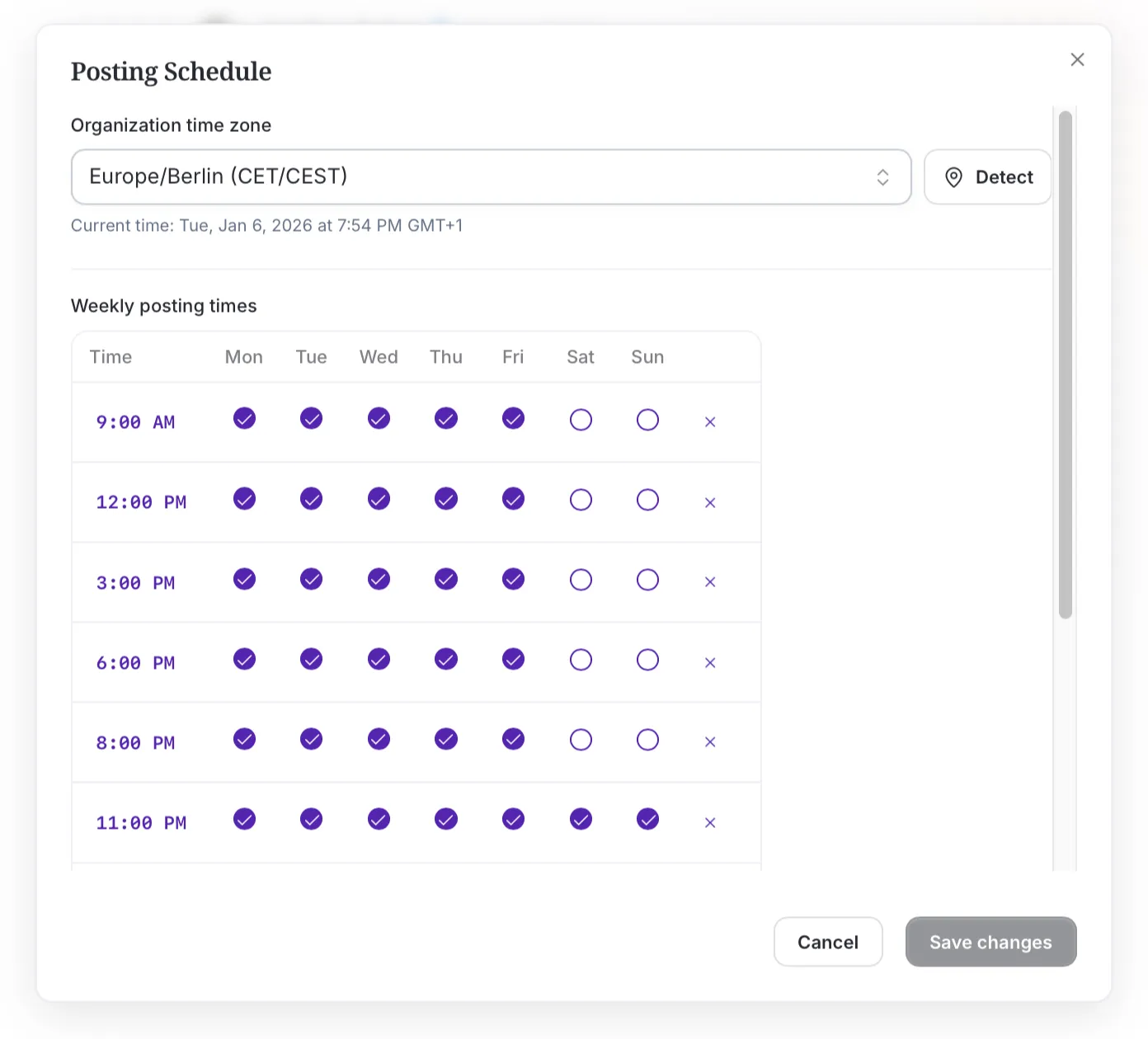
Weekly posting schedule with time slots per day
The calendar shows everything that is scheduled in month, week, day and list views. A platform filter switches between X, LinkedIn or both. All times follow your workspace timezone.
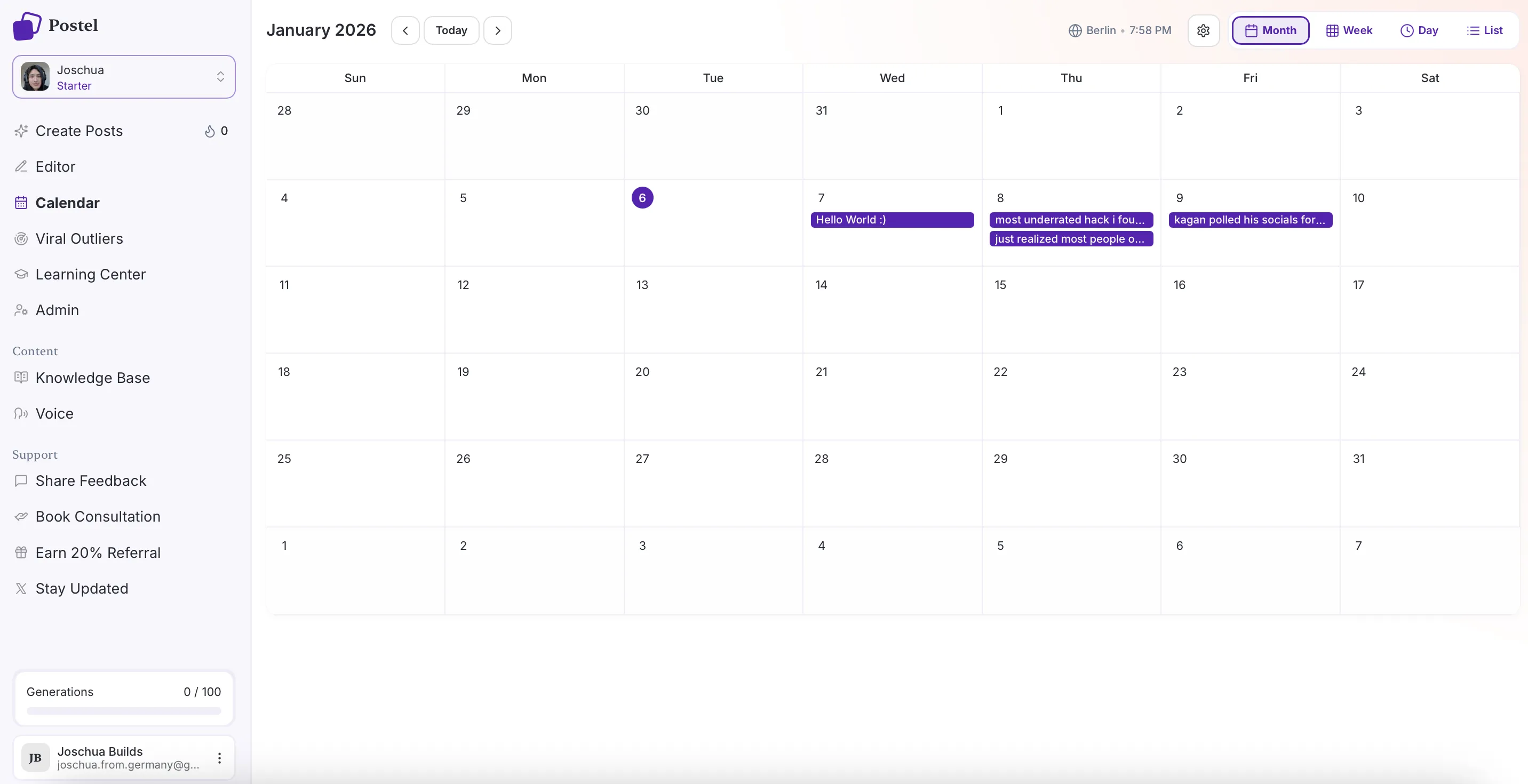
Postel content calendar in month view
Write LinkedIn Posts in Your Own Voice
Most scheduling tools assume you already have the post. Postel also helps you write it.
- Voice from a LinkedIn profile. Paste a public LinkedIn profile URL, yours or a writer you admire. Postel reads recent posts and builds a voice profile from them.
- Knowledge base. Store your topics, product details and opinions. Drafts draw on them, so posts carry your facts instead of generic advice.
- Repurposing. Turn a YouTube video, podcast, reel or article into LinkedIn posts.
- LinkedIn-specific drafting. Generation uses LinkedIn's 3,000-character limit and writes hooks for the lines above the fold.
Adapt X Posts and Threads for LinkedIn
If you already post on X, "Adapt" turns an X post or thread into a LinkedIn post. A thread is merged into one post. Each idea keeps one version per platform, so you can edit the LinkedIn copy without touching the X one.
This is the quickest way to start on LinkedIn: take the X posts that already worked and adapt them. Postel's X post scheduler handles the X side.
How to Schedule Posts on LinkedIn Without a Tool
LinkedIn has a built-in scheduler, and it is free. On desktop:
- Click Start a post at the top of your homepage and write the post.
- Click the clock icon in the lower-right corner.
- Pick a date and time in the Schedule post window.
- Click Next, then Schedule.
It works in the mobile app too: tap Post, write, tap the clock icon, pick a time, then tap Next and Schedule.
You can schedule a post from 10 minutes to 3 months ahead. To edit, reschedule or delete one, start a post, click the clock icon and open View all scheduled posts. Event, job and service posts cannot be scheduled this way. These details come from LinkedIn Help.
The built-in scheduler is fine for the occasional post. It does not help you write, it has no weekly slots or calendar, and it does not connect to your X content.
LinkedIn's Built-in Scheduler vs Postel
| LinkedIn built-in | Postel | |
|---|---|---|
| Schedule a post for later | Yes | Yes |
| Price | Free | Paid plans, 7-day trial |
| Weekly posting slots | No | Yes |
| Calendar across X and LinkedIn | No | Yes |
| Drafting in your voice | No | Yes |
| Adapt X posts and threads | No | Yes |
| First comment added automatically | No | Yes |
| Company pages | Yes | No |
What Postel Does Not Do on LinkedIn
- No company pages. Postel publishes to personal profiles only.
- No LinkedIn analytics. Postel does not show LinkedIn post statistics.
- No @mentions. LinkedIn gives connected apps no way to look up people, so tag them on LinkedIn after the post is live.
- Reconnect every 60 days. LinkedIn connections expire after 60 days. Postel emails the workspace owner a week before, and reconnecting takes one click.
If LinkedIn rejects a post, it goes back to your drafts with the reason, and the workspace owner gets an email.
Schedule LinkedIn Posts from Claude or Cursor
Postel has an MCP server, so an AI assistant can draft a LinkedIn post in your voice and schedule it after you approve it. See the LinkedIn MCP server page for setup, or the guide to connecting Claude to LinkedIn.
Pricing
- Starter: $19/month billed yearly, or $29 month to month.
- Professional: $29/month billed yearly, or $49 month to month, with 3x the usage and up to 3 seats.
Both plans include scheduling for X and LinkedIn and start with a 7-day trial. See the full pricing.
Frequently Asked Questions
Can you schedule posts on LinkedIn?
Yes. LinkedIn has a built-in scheduler: start a post, click the clock icon, pick a date and time, click Next and then Schedule. A tool like Postel adds posting slots, a calendar, drafting in your voice and a first comment.
How far in advance can you schedule a LinkedIn post?
LinkedIn's built-in scheduler accepts a time between 10 minutes and 3 months from now for personal profiles.
Can I schedule LinkedIn carousels?
Yes. A LinkedIn carousel is a document post. In Postel you attach one PDF, PowerPoint or Word file (up to 100 MB), give it a title, and schedule it like any other post.
Can I schedule a first comment on LinkedIn?
Yes. Add the comment in the first comment field and Postel posts it right after the post is published. If the comment fails for any reason, the post itself stays published.
Does Postel work with LinkedIn company pages?
No. Postel publishes to personal LinkedIn profiles only.
Can I schedule the same post to X and LinkedIn?
Yes. Write the post for one platform and use Adapt to create the version for the other. Each version is scheduled on its own, so you can pick different times.
How many LinkedIn posts can I schedule?
LinkedIn allows up to 150 posts per member per day through connected apps, which is far more than a posting schedule needs.
Is there a free LinkedIn post scheduler?
LinkedIn's built-in scheduler is free. Postel is a paid tool with a 7-day trial.
Related: