












Muting words on X (formerly Twitter) removes posts containing specific terms from your timeline and notifications without unfollowing accounts or blocking anyone. This feature helps you avoid spoilers, filter out topics you're tired of, or reduce exposure to triggering content. Here's how to set it up effectively.
How to Mute Words
On Mobile (iOS/Android)
- Tap your profile icon
- Select "Settings & Support"
- Tap "Settings and privacy"
- Select "Privacy and safety"
- Tap "Mute and block"
- Select "Muted words"
- Tap the plus (+) icon
- Enter the word, phrase, hashtag, or emoji
- Configure your settings (see below)
- Tap "Save"
On Desktop
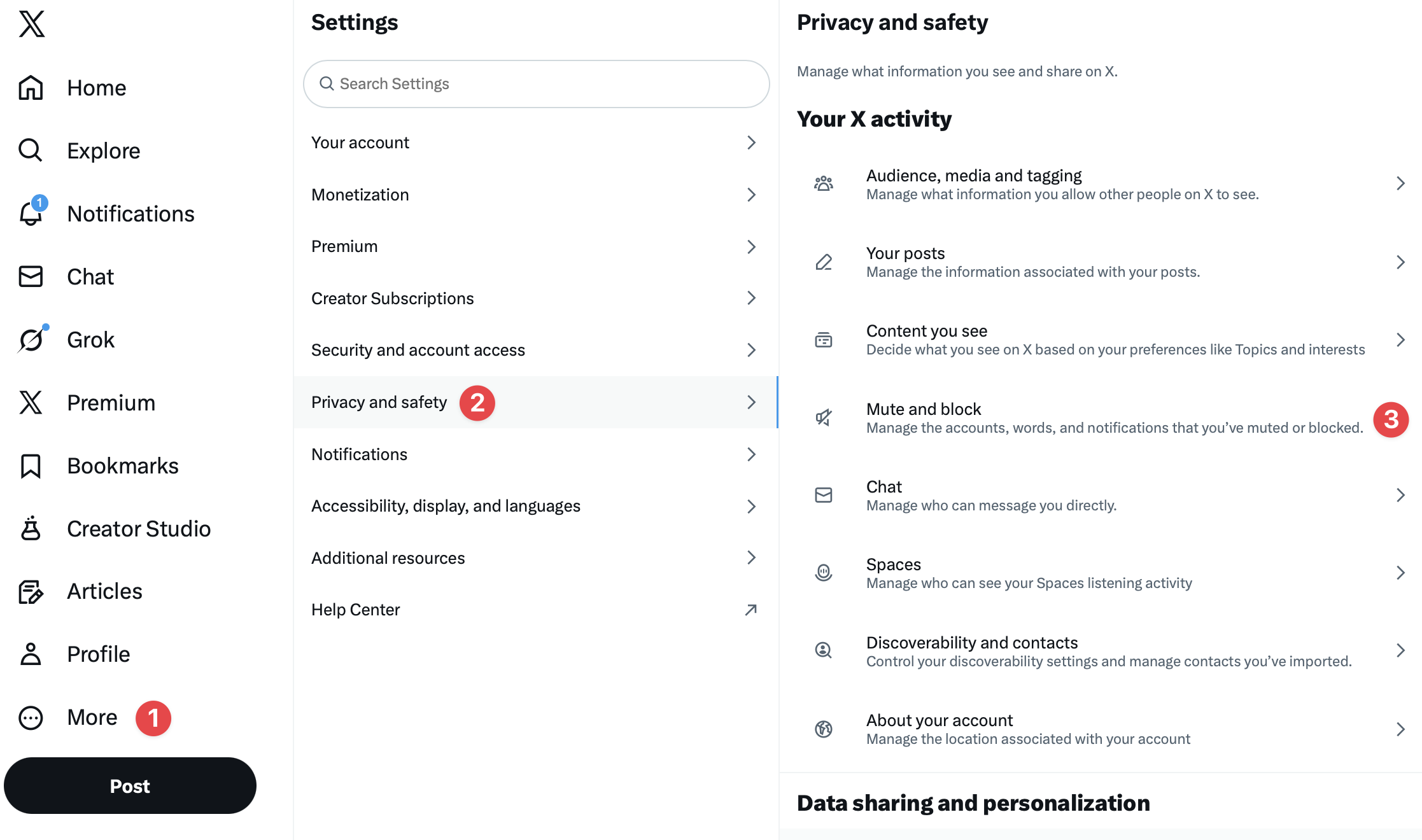
- Click "More" in the left sidebar
- Select "Settings and Support"
- Click "Settings and privacy"
- Navigate to "Privacy and safety"
- Select "Mute and block"
- Click "Muted words"
- Click "Add" or the plus icon
- Enter your term and configure settings
- Click "Save"
Configuration Options
When adding a muted word, you can customize:
Where to Apply
Home timeline: Hides posts in your main feed
Notifications: Hides notifications containing the term
Both: Maximum filtering across the platform
Who to Mute From
From anyone: Mutes the term from all accounts
From people you don't follow: Only mutes from accounts you haven't followed (available for notifications only)
Duration
Choose how long the mute lasts:
- Forever: Until you manually remove it
- 24 hours: Good for event spoilers
- 7 days: For short-term topics
- 30 days: For longer-term filtering
What You Can Mute
X allows muting of:
- Individual words: "spoiler"
- Phrases: "game of thrones"
- Hashtags: "#election" (also mutes "election" without the hashtag)
- Usernames: "@someaccount"
- Emojis: Specific emoji characters
Note: Muting a word automatically mutes its hashtag version. Muting "Olympics" also mutes "#Olympics."
How Muting Affects Your Experience
What Gets Hidden
When you mute a word:
- Posts containing that word don't appear in your Home timeline
- Notifications from posts with that word don't show up
- Reposts and quote posts containing the word are filtered
- Replies in threads containing the word may be hidden
What Still Shows
Muted words don't affect:
- Search results (you'll still see muted terms in search)
- Direct messages
- Posts you specifically navigate to
- Trending topics containing the word
Privacy
Muting is completely private:
- Users never know you've muted words
- No notifications are sent
- Your mute list is invisible to others
Strategic Muting
Spoiler Prevention
Before a major event (sports game, TV finale, movie release):
Mute temporarily (24 hours - 7 days):
- Team names
- Show/movie title
- Character names
- "Spoiler," "spoilers"
- Related hashtags
- "Ending," "finale," "wins"
Topic Fatigue
When you're tired of a topic:
Mute longer term (30 days - forever):
- Topic keywords
- Key figures' names
- Related hashtags
- Common phrases in that discourse
Mental Health
To reduce exposure to distressing content:
Mute indefinitely:
- Triggering terms
- Negative keywords
- Accounts that frequently post about the topic
Political/News Filtering
During election seasons or news cycles:
Mute strategically:
- Candidate names
- Party names
- Event hashtags
- Common debate terms
Building Effective Mute Lists
One word rarely covers everything. Build comprehensive lists:
Think in Clusters
For "Game of Thrones" spoilers:
- "Game of Thrones"
- "#GOT"
- "#GameOfThrones"
- "Westeros"
- Character names
- "Season finale"
Include Variations
- Abbreviations (GOT, POTUS)
- Nicknames
- Common misspellings
- Related hashtags
Update Regularly
Topics evolve. New terms emerge. Review your mute list periodically.
Managing Your Mute List
Viewing Muted Words
Go to Settings > Privacy and safety > Mute and block > Muted words
Here you see all active mutes with their settings.
Editing Mutes
Tap any muted word to modify:
- Change duration
- Adjust where it applies
- Modify who it mutes from
Removing Mutes
Tap the word and select remove, or swipe left (mobile) to delete.
Muting vs. Blocking vs. Unfollowing
Muting words:
- Hides content with specific terms
- Affects all accounts
- Can be temporary
- Completely private
Muting accounts:
- Hides all content from specific users
- You stay following them
- They don't know
- Private
Blocking accounts:
- Prevents all interaction
- Removes follow relationship
- They may notice (can't view your profile)
- Semi-private
Unfollowing:
- Removes their content from your timeline
- You can still see their content by visiting their profile
- They may notice (follower count drops)
- Visible
Limitations of Word Muting
Understand what muting cannot do:
Cannot mute images: Visual content without text passes through
Cannot mute videos: Video content is not text-analyzed
Search still shows results: Muting only affects timeline and notifications
Imperfect matching: Creative spellings may bypass mutes
Manual addition: You must add each term individually
Frequently Asked Questions
Do muted words apply to DMs?
No. Direct messages are not filtered by word muting. The feature only affects your public timeline and notifications.
Can I import a mute list?
Not directly through X. Some third-party tools offer bulk mute management, but standard X requires adding words individually.
Do muted words sync across devices?
Yes. Mute settings apply to your account across all platforms (mobile, desktop, tablet).
Will I miss important posts from people I follow?
Potentially. If someone you follow posts about a muted topic, you won't see it. Consider temporary muting for spoilers rather than permanent muting of topics discussed by accounts you value.
Can I mute phrases with special characters?
X handles most phrases, but very complex strings may not mute consistently. Test your specific phrase to verify it works.
Word muting gives you control over your X experience without the social implications of unfollowing or blocking. Use it strategically to reduce noise, avoid spoilers, and create a timeline that serves your interests.